RDSHAPE 3D SOUND SYSTEM DESIGN AND PREDICTION TOOL


NEW
RDSHAPE
3D SOUND SYSTEM DESIGN AND PREDICTION TOOL
- Accurate 3D Acoustic Simulation
- Comprehensive Sound System Design
- Mechanical Validation and Safety
- 3D Venue Modeling
RDShape
Caractéristiques
- Accurate 3D Acoustic Simulation
- Comprehensive Sound System Design
- AutoSplay and Sub Array Configuration
- Mechanical Validation and Safety
- 3D Venue Modeling
- STEP files for Collaboration
- Fine Tune with EQs & Filters
- Available on Windows and macOS
RDShape is a 3D sound system design and acoustic-simulation platform for TT+ Audio speakers and subs. It lets touring pros, venue designers, and engineers virtually lay out rigs, predict coverage and SPL, check rigging safety, and export system documentation.


Precision System Design and Simulation
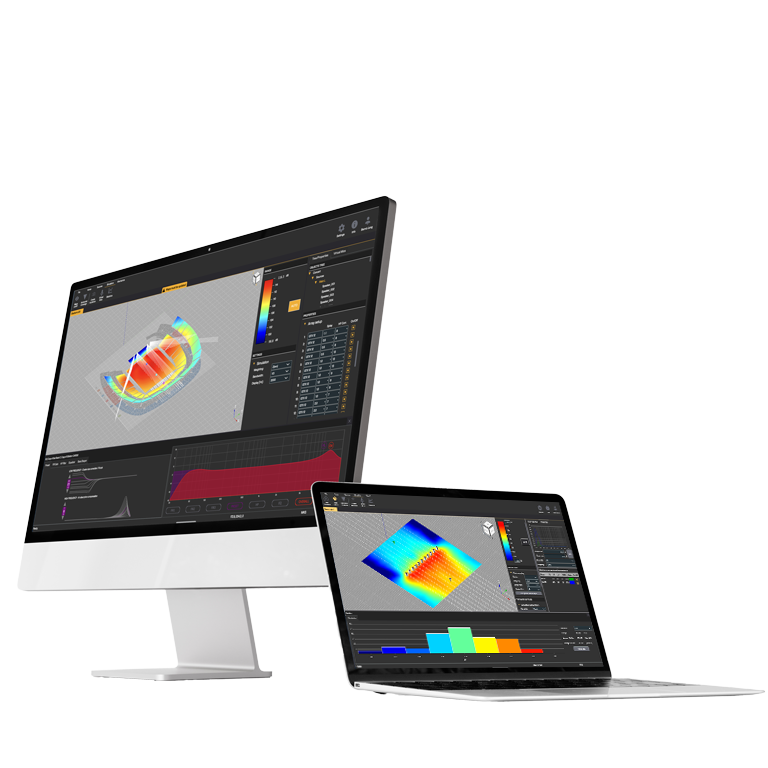
RDShape is an advanced simulation software, purpose-built for acoustic modeling and system optimization of RCF and TT+ Audio speaker and subwoofer systems. Designed to streamline the design, setup, and tuning process, RDShape is a versatile tool for touring professionals, venue designers, and sound engineers. Whether planning a small performance or a large-scale installation, RDShape ensures precise predictions, seamless configuration, and robust safety compliance.
Accurate Acoustic Simulation
Predict SPL and frequency response across audience areas, enabling finely tuned performance for every seat.
Comprehensive System Design
Use the autosplay feature for optimal line array angles and evaluate subwoofer configurations with virtual microphones.
Rigging & Safety Integration
Access detailed rigging data, including load, fly bar strength, pick points, and weight distribution, ensuring safe and efficient installations.
3D Venue Modeling
Define audience planes and simulate sound propagation with a full 3D venue visualization, including IR-based virtual microphone measurements.
Streamlined Workflow
Leverage templates, import venue basemaps, and export key design elements as STEP (ISO 10303) or PDF files for seamless collaboration.
Advanced EQ & Filters
Fine-tune system performance with FiRPHASE filters, Bass-Shaper, and EQ presets directly within the software.
On-Axis audience area modeling iOS App
Full compatibility with OK-Sound On-Axis.
Tailored for Efficiency
RDShape offers a user-friendly interface with powerful tools like integrated templates, autosplay, and drag-and-drop sound source placement. Users can visualize energy distribution in high detail, evaluate statistical sound levels, and manage filter settings—all before system deployment at the venue.


Touring and Fixed Installations
From quick mobile setups to permanent installations, RDShape reduces setup time, ensures safety, and provides a detailed acoustic blueprint. Its compatibility with RDNet allows for real-world system testing and optimization, bridging the gap between simulation and live deployment.

Design. Simulate. Experiment. Deliver.
From the first sketch to the final speaker list, our acoustic-prediction software guides you step by step: model the venue, run simulations, adjust parameters, find the best results and export production-ready specifications.

Quick Design and Collaboration
Start with templates, import venue basemaps or 3D models from our library of certified venues. Or build a sophisticated model of the venue for accurate system design. Export key design elements as STEP (ISO 10303) or PDF files for seamless collaboration

Shape your Sound System
Place any point-source, line array, or subwoofer in your 3D model and see the SPL coverage at once. Use symmetry to copy and link sources—edit one, and both update together.

On-Axis audience area modeling iOS App
Ok-Sound’s On-Axis is an iOS App for accurate audience area modeling. The app supports fast measurement workflows and pairs with Bluetooth laser distance meters. On-Axis projects can be exported in RDShape’s native file format, providing complete compatibility with RDShape.


Autosplay
Set an SPL target and let Autosplay do the math. It analyzes vertical coverage, then fine-tunes inter-element angles to preserve wavefront integrity and hit your SPL goal.

Iterate with confidence
Move loudspeakers, adjust angles, apply array processing, or change atmospheric settings and check the impact on SPL coverage and frequency-response stability. RDShape shows exactly how each choice shapes the result.

Map every speaker
Predict SPL for any sound source—or the whole system—across any frequency range. View results in dBA, dBC, or flat dB. Use delays, EQs, and other unique filter options such as FIR or Bass-Shaper to align and tune your sources.

Streamlined workflow
Access System Preferences and all built-in features as they exist in RDNet under real-world conditions.

Mechanical Validation
Ensure safe and efficient installations and quickly overview essential data such as strength, fly bars, pick-up points, and weights for the rigging process in the field.

Installation Report
Quickly view important mechanical data about load, pick point locations and angle settings of the system with easy export to PDF for installers at the venue.

EASE
Use our complete GLL library to model and visualize the performance of sound systems across a wide variety of configurations and environments with AMFG® EASE and EASE Focus.

STEP
Share your designs for easy collaboration with every production department. STEP files allow easy file sharing across different software programs through a standardized 3D model and design format (ISO 10303).
Video Tutorials
Settings
Basemap
Geometry Definition
Geometry Editing
Audience Areas
Single Array
Subwoofer
DSP
Groups
Simulation parameters
Data Visualization
Report
Availabe on Windows and macOS
Spécifications generales
Operating systems:
Windows 11
Windows 10
Windows 7
Windows Vista
macOS
Windows 10
Windows 7
Windows Vista
macOS
Conformité standard
Safety agency
CE compliant
Taille / Poids
Poids
0.01 kg / 0.02 lbs
Infos colisage
Poids du colis
0.1 kg / 0.22 lbs
FICHES TECHNIQUES





2026 Copyright ® RCF. All rights reserved | RCF S.P.A. cf/p.iva 04081310965


